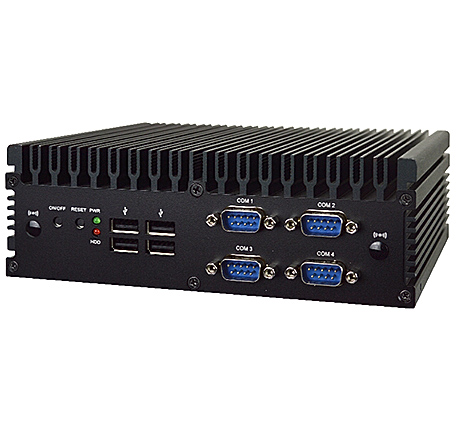
- Intel® Core™ Ultra 7 155U / Ultra 5 125U, Meteor Lake
- Long-Life Embedded Class with Lifecycle up to 10 Years
- Supports 3 Displays, HDMI 2.0, DP 1.4, Type-C DP 1.4
- 1 * M.2 M-key for SSD, , 1 * M.2 B-key, 1 * M.2 E-key
- 2 * Intel 2.5GbE LAN, 4 * USB 3.2 Gen2, 4 * Serial
- 2 * DDR5-5600 Dual Channel SODIMM up to 96GB
- Supports BIOS Recovery, ECO-design for EuP/ErP

Specification

Model Series

B382FMTU1

Part Number B382FMTU1-A311 (Core™ Ultra 7 155U)
B382FMTU1-A111 (Core™ Ultra 5 125U)
B382FMTU1-A411 (Core™ Ultra 7 155U, Onboard TPM 2.0)
B382FMTU1-A211 (Core™ Ultra 5 125U, Onboard TPM 2.0)
Motherboard Specification
CPUIntel® Core™ Ultra 7 Processor 155U, Formerly Meteor Lake, vPro Essentials (Base Power 15W)
Intel® Core™ Ultra 5 Processor 125U, Formerly Meteor Lake, vPro Essentials (Base Power 15W)
Memory2 x Dual Channel Non-ECC DDR5-5600 MT/s SODIMM up to 96GB
NPUIntel® AI Boost with NPU
GraphicsIntel® Graphics
AudioRealtek ALC897 HD Audio and 3W Amplifier
LAN1 x Intel I226-V 2.5GbE
1 x Intel I226-LM PCIe 2.5GbE
Storage1 x SATA3 6Gb/s
1 x M.2 2242/2280 (PCIe 4.0 x4 NVMe or SATA, M-key)
Expansion1 x M.2 E-key, 2230 (USB2.0 and PCIe 3.0 x1 CNVi WiFi)
1 x M.2 B-key, 3042 3052 (USB3.2 and PCIe 3.0 x2 for Cellular)
TPMIntel fTPM 2.0 (PTT) Trusted Computing FirmwareIntel fTPM 2.0 (PTT) Trusted Computing Firmware
Onboard NUVOTON TPM v2.0
Chassis Specification
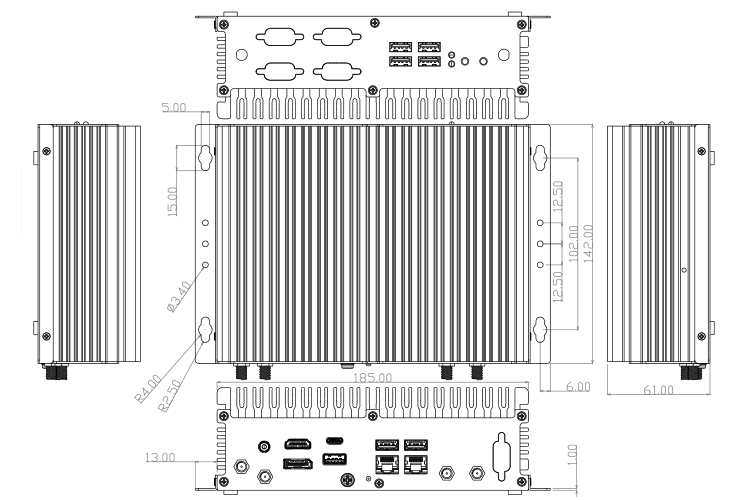
Enclosure Size185 (W) x 142(D) x 61 (H) mm
Storage BayNA due to Thermal Design
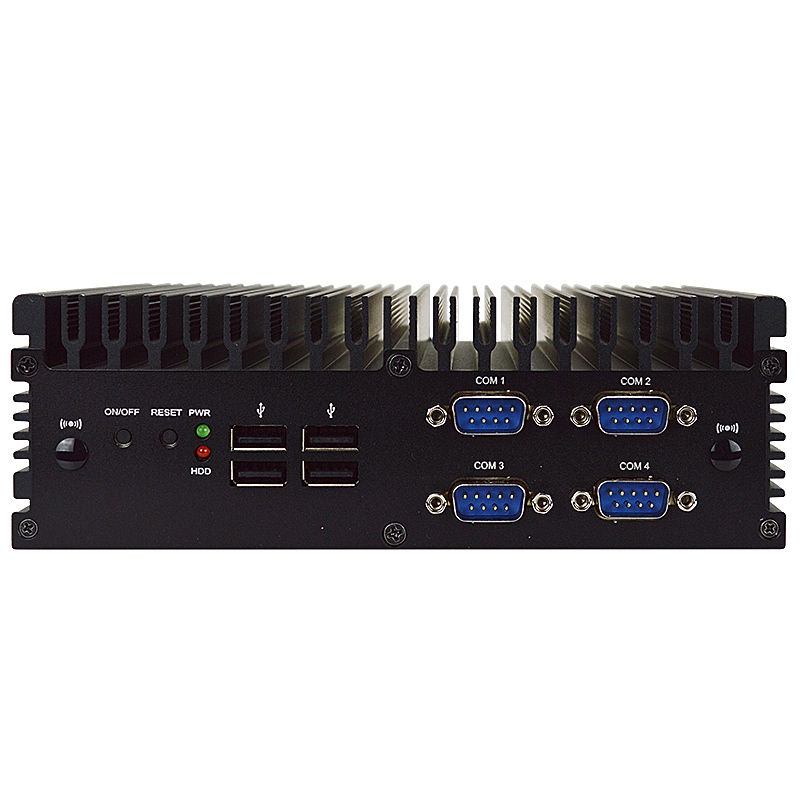
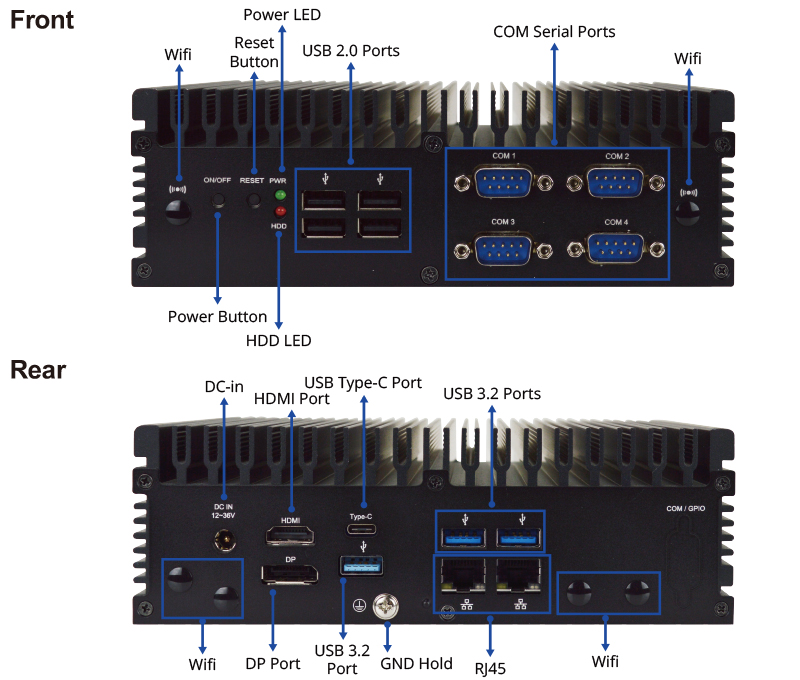
Front I/O Port 1 ON/OFF Button
1 Reset Button
1 Power LED
1 HDD LED
4 USB 2.0 Ports
4 Serial Ports (4 * RS232/422/485)
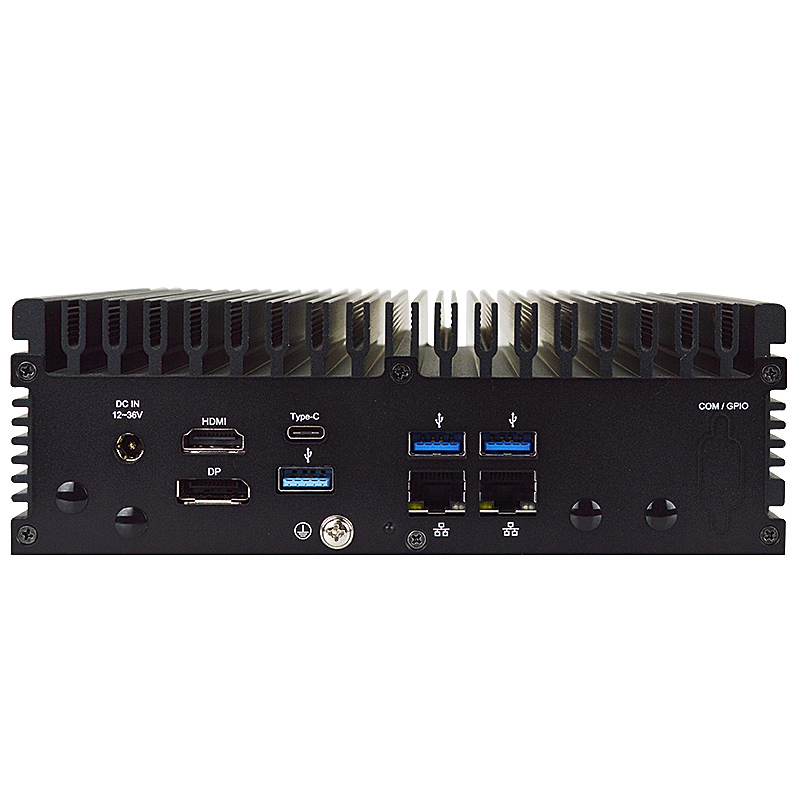
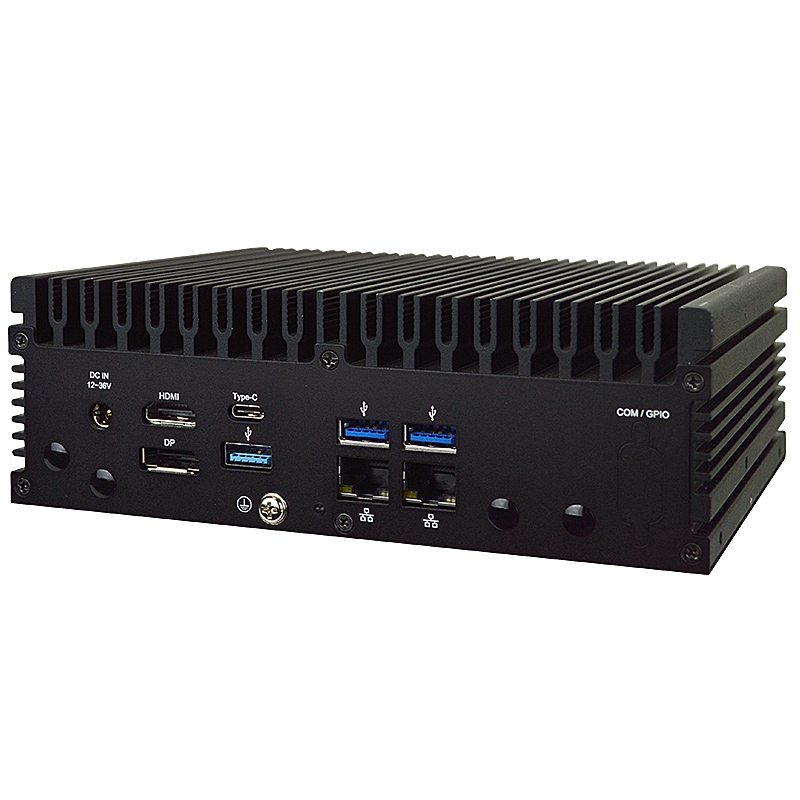
Rear I/O Port 4 Antenna Holes
1 12V ~ 36V DC-in Jack
1 HDMI 2.0b (4096 x 2160 @ 60Hz)
1 DP 1.4 (4096 x 2160 @ 60Hz)
1 USB 3.2 Gen 2x2 Type-C (20 Gb/s) with DP 1.4 (4096 x 2160 @ 60Hz)
3 USB 3.2 Gen 2x1 (10 Gb/s)
2 RJ45 2.5GbE LAN (10/100/1000/2500)
PowerAdapter: AC 90~240V input / DC19V_90W output
EnvironmentOperating Temperature : -20°C ~ 60°C (M.2 SSD)
Storage Temperature : -20°C ~ 85°C
Humidity : 10% ~ 90% RH @40°C (non-condensing)
ApplicationEmbedded Workstation, Digital Signage, Industrial PC
CertificateCE,FCC,ErP,RoHS For Barebone
CE,FCC,TUV,UL,CCC,CB,ErP For Power Adapter
Connectivity

Mechanical Drawing

Ordering Info
Part Number Description
B382FMTU1-A311 Fanless barebone, Core™ Ultra 7 155U, Non-WIFI
B382FMTU1-A411 Fanless barebone, Core™ Ultra 7 155U, Onboard TPM 2.0, Non-WIFI
B382FMTU1-A111 Fanless barebone, Core™ Ultra 5 125U, Non-WIFI
B382FMTU1-A211 Fanless barebone, Core™ Ultra 5 125U, Onboard TPM 2.0, Non-WIFI
HCS370MWM01B-2-F (Incl) Wall & DIN Rail mount kit
HCS3XXDINRAILPS-F (Incl) DIN Rail kit
L01AS062-F (Incl) Adapter 19V 90W
OS Support List
Windows Linux
Windows 10 64bit CentOS 9
Win 10 IoT Enterprise 64-bit Debian 11.4
Windows 11 64bit Fedora 36-1.5
Win 11 IoT Enterprise 64-bit OpenSUSE 15.4
Ubuntu 22.04
pfSense 2.6.0
OpenBSD 7.1
Downloads
B382FMTU1 BIOS JT1 (Default Intel PTT) Release Date 2025-8-19
Description First Release for Production.
Download  JMTU1JT1.ZIP for UEFI (BIOS Recovery *.RY file included)
Flash Instructions for UEFI 1. Unzip the file and copy to the USB flash drive with FAT32 format.
2. Insert the USB drive, Enter BIOS, and select "Built-in EFI Shell" from Boot Override.
3. Type "fs0:" to change path when you see Shell prompt. Might be "fs1:" if you have more than one drive.
4. Type *.NSH to auto update BIOS.
5. Power off the system after the update finished.
* Read Detailed Instructions in PDF
Revised History [A01]. Initial BIOS.
B382FMTU1 BIOS JW2 (Default dTPM) Release Date 2025-8-19
Description First Release for Production.
Download  JMTU1JW2.zip for UEFI
Flash Instructions for UEFI 1. Unzip the file and copy to the USB flash drive with FAT32 format.
2. Insert the USB drive, Enter BIOS, and select "Built-in EFI Shell" from Boot Override.
3. Type "fs0:" to change path when you see Shell prompt. Might be "fs1:" if you have more than one drive.
4. Type *.NSH to auto update BIOS.
5. Power off the system after the update finished.
* Read Detailed Instructions in PDF
Revised History [A01]. Initial BIOS.

· Please do not flash the BIOS UNLESS your system has a BIOS-related issue. Flashing the wrong BIOS can cause irreparable damage to the system.
· Please be aware that by flashing this BIOS you agree that in the event of a BIOS flash failure, you must contact your dealer for a BIOS replacement. There are no exceptions to this policy. Jetway does not have a policy of replacing BIOS chips directly with end users.


Drivers for B382FMTU1
  Windows 10 (64 bit) Windows 11 (64 bit)
NPU  npu_mtl.zip  npu_mtl.zip
PMT  pmt_mtl.zip  pmt_mtl.zip
Chipset  inf_mtl.zip  inf_mtl.zip
Graphic  gfx_mtl.zip  gfx_mtl.zip
Sound  audio_dch_mtl.zip  audio_dch_mtl.zip
LAN  Intellan_i22x_win.zip  Intellan_i22x_win.zip
RST  rst_mtl.zip  rst_mtl.zip
ME  ime_mtl.zip  ime_mtl.zip
SIO  sio_mtl.zip  sio_mtl.zip
Manual
Barebone Install Guide  B382FMTU1_Manual.pdf
Resources
FCC  Reports available upon request
CE  Reports available upon request
LVD  Reports available upon request
RoHS  Reports available upon request
Power Consumption Report  Reports available upon request
Temperature Test Report  Reports available upon request
Watchdog/GPIO sample code  Watchdog and GPIO sample code for Windows and Linux